

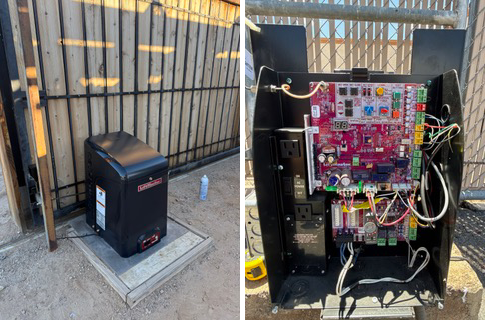
Automatic Gate Troubleshooting: What to Check Before Calling for Repair
A practical guide for homeowners, property managers, HOAs, multifamily communities, and commercial facilities.
An automatic gate that suddenly stops working does not necessarily mean the gate operator has failed. Automatic gates are systems made up of structural, mechanical, electrical, safety, and access-control components. A problem with any one of them can make the entire entrance appear broken.
The goal of troubleshooting is not to bypass a fault and force the gate to operate. It is to identify whether the problem appears to be power, controls, safety devices, access control, the operator, or the gate itself so the correct repair can be made.
Understand the Complete Gate System
- Gate frame, posts, hinges, rollers, wheels, or track
- Gate operator and drive components
- Power supply and battery backup
- Photoelectric sensors and monitored safety edges
- Vehicle loops or other detection devices
- Remotes, keypads, readers, and access control
- Limit switches, position sensors, wiring, and controls
Industry reference: UL 325 addresses safety requirements for gate operators, while ASTM F2200 addresses automated vehicular gate construction. DASMA Installer Guide to ASTM F2200
Problem 1: The Gate Will Not Open
Start with simple observations before assuming the operator is defective.
- Confirm that electrical power is available to the operator.
- Check for an obviously tripped breaker or disconnected local power source.
- Look for fault codes, warning lights, or diagnostic LEDs before resetting the system.
- Try another authorized entry method such as a second remote, keypad, local control, or access-control credential.
- Make sure the gate is not manually locked with a padlock, drop rod, or other mechanical lock.
If one access device works and another does not, the operator may be functioning correctly and the problem may be the remote, keypad, receiver, programming, or access-control system.
Manufacturer reference: LiftMaster offers remote controls and smart gate connectivity across compatible systems. LiftMaster Gate Remote Controls
Problem 2: The Gate Opens but Will Not Close
A gate that opens normally but refuses to close often deserves an immediate look at the safety devices and the path of travel.
- Photo eyes blocked by dirt, landscaping, spider webs, trash, or parked equipment
- Misaligned or damaged photoelectric sensors
- A monitored safety edge reporting a fault
- A vehicle loop or other detector keeping the gate in a hold-open state
- An obstruction in the swing or slide path
Do not bypass a photo eye or monitored safety device simply to make the gate close. A gate refusing to close may be responding to a real safety condition or a device fault that needs correction.
Problem 3: The Gate Starts Closing and Then Reverses
Reversal can be caused by a safety input or by excessive mechanical resistance.
On a swing gate, look for dragging, sagging hinges, a bent frame, landscaping in the path, an incorrect stop, or operator-arm binding. On a slide gate, look for debris in the track, damaged V-track, worn wheels, guide-roller problems, chain binding, or the frame contacting a post.
A properly automated gate should move freely as a gate. The operator should not be used to overcome structural or mechanical problems.
Problem 4: The Operator Runs but the Gate Does Not Move
- Broken or disconnected chain
- Chain off a sprocket
- Operator arm or bracket failure
- Drive connection failure
- Gearbox or internal drive problem
- Broken gate hardware
Stop repeated operation if the motor runs but the gate is not moving normally. Continued force can turn one failed component into multiple damaged components.
Problem 5: The Gate Is Moving Slowly
- Weak or depleted batteries
- Charging-system problems
- Gate resistance from worn hinges, wheels, or rollers
- Sagging gate frame
- Mechanical binding
- Operator or drive problems
If the gate has gradually slowed, inspect the gate mechanics before assuming the solution is a larger operator. An operator attached to a dragging or binding gate is being asked to do work it should not have to do.
Problem 6: A Swing Gate Is Sagging or Dragging
- Worn or bent hinges
- Loose hinge mounts
- Cracked welds
- Leaning or undersized posts
- Twisted frame
- Insufficient bracing
This is where fabrication matters. A new operator will not permanently correct a structural problem. Depending on condition, the proper repair may involve welding, hinge replacement, post repair, reinforcement, or rebuilding the gate.
Industry reference: DASMA discusses structural considerations when automating swing gates, including the relationship between safe gate construction and operator longevity. DASMA Structural Considerations of Swing Gate Automation
Problem 7: A Slide Gate Is Noisy or Jerky
- Track damage or debris
- Worn wheels
- Guide-roller wear or misalignment
- Chain or sprocket wear
- Operator alignment problems
- Bent gate frame
Manufacturer reference: Nice/HySecurity offers slide operators across residential, commercial, and industrial applications, underscoring the importance of matching operator and gate requirements. Nice / HySecurity Slide Gate Operators
Problem 8: The Gate Works Only Sometimes
Intermittent problems are easier to diagnose when you document the conditions. Note whether the problem occurs after repeated cycles, at a certain time of day, after rain, only with one access device, or during extreme heat. Photograph any fault code before resetting the operator.
Problem 9: The Gate Opens by Itself
- Vehicle-loop activation
- Hold-open schedule or timer
- Access-control command
- Remote or transmitter issue
- Control wiring problem
- Control-board fault
Manufacturer reference: Modern CellGate systems can combine gate access, visitor management, video, and event management depending on configuration. CellGate Watchman Video Intercom
A Five-Minute Automatic Gate Check
- Power appears available
- Another authorized remote or keypad has been tried
- Photo eyes are clean and unobstructed
- Nothing is blocking the gate path
- Swing gate is not dragging
- Slide gate track is clear
- Hinges, wheels, rollers, and brackets show no obvious failure
- Operator fault code has been documented
- Gate is not mechanically locked
Do not bypass safety devices, defeat a fault, or open energized equipment unless you are qualified and following the manufacturer’s service procedures.
When to Stop Using the Gate
- The gate is severely sagging or could fall
- A post is moving significantly
- Major welds or brackets are broken
- A slide gate is coming off track
- A wheel or hinge has failed
- Safety devices are not functioning correctly
- The gate moves unexpectedly
- The operator is smoking, overheating, or showing obvious electrical damage
Automatic Gate Repair in Arizona
Gecko Service Pros services the complete gate system, including swing and slide gates, operators, gate welding, hinges, rollers, wheels, tracks, LiftMaster equipment, photo eyes, vehicle detection, keypads, and access control.
The useful troubleshooting question is not simply “Why isn’t the motor working?” It is “What part of the gate system is causing the failure?”
Frequently Asked Questions
- Why will my automatic gate open but not close?
Blocked or misaligned safety devices, monitored-edge faults, vehicle detection, or an obstruction can all prevent closing. Do not bypass the safety system to force operation.
- Why does my gate reverse before it closes?
The system may be sensing an obstruction or excessive resistance. Check the gate path and visible mechanical condition, then have the operator and safety system diagnosed if the issue continues.
- Can a sagging gate damage the operator?
Yes. A dragging or binding gate increases the force required every cycle and can accelerate operator, bracket, hinge, or drive wear.
- Should I reset the operator before calling for service?
Document any fault code first. A reset can erase useful diagnostic information.
- Can I bypass the photo eye temporarily?
Safety devices should not be bypassed to keep an automated vehicular gate operating. The cause of the safety fault should be corrected.
Industry & Manufacturer References
- DASMA – Installer Guide to ASTM F2200
- DASMA – Gate Operators and ANSI/UL 325
- DASMA – Structural Considerations of Swing Gate Automation
- LiftMaster – Gate Remote Controls
- Nice / HySecurity – Slide Gate Operators
- CellGate – Watchman Video Intercom
Gecko Service Pros
Garage Doors • Gates • Fabrication • Access Control • Commercial Services